Workload Mapping
See what runs where, from the hypervisor down to the container.
Scanopy discovers your hypervisors and container runtimes and nests every VM and container inside the host that runs it, with the services each one exposes.

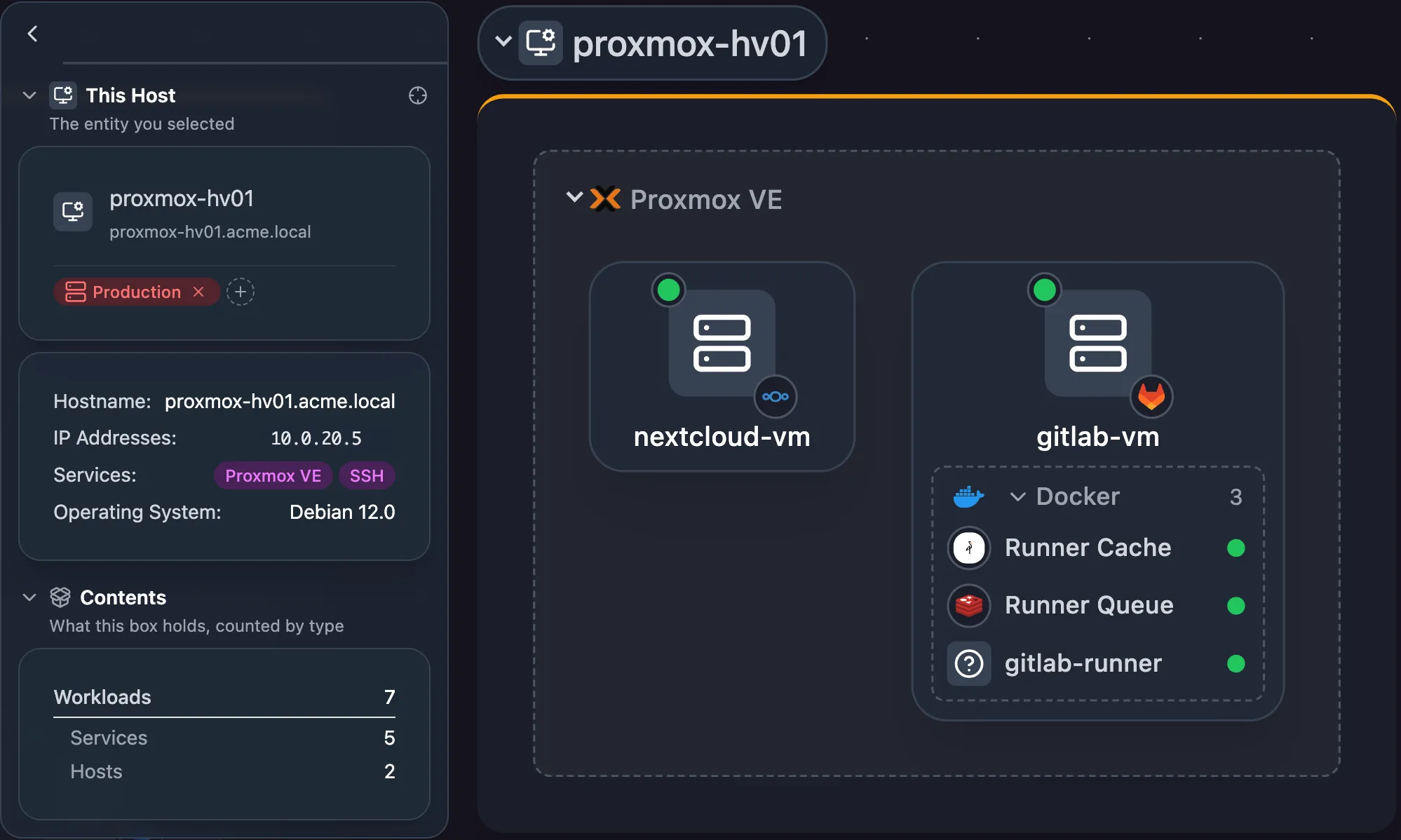
Reboot without surprises
VMs sit inside their hypervisor, and containers sit inside the host or VM that runs them. Each host’s card shows everything that runs on it.
Related features
Network Mapping Physical (L2) and logical (L3) diagrams of your network, drawn from the network itself Explore Application Mapping Diagrams of each application, the services it depends on and the hosts they run on Explore Device Inventory A searchable inventory of every host discovery finds, with its addresses, services, ports and interfaces Explore
FAQ
Frequently asked questions
Which hypervisors and container runtimes does Scanopy support?
Hypervisors: Citrix Hypervisor, ESXi, Proxmox VE, libvirt (KVM), and vCenter. Container runtimes: Docker and Podman.
Do I need to install an agent on every host?
No. Scanopy reads Proxmox through its API, and Docker or Podman through the local socket or an API proxy running on the remote host.
How do I set it up?
Step by step: connect Proxmox, map Docker containers, or map Podman containers.